You found a creator who fits the brief. Now you need their email, their real engagement rate, and whether those 80K followers are real people. So you Google their name, click through five profiles, squint at a Linktree, and give up. A good Chrome extension collapses that loop into one click on the profile you're already looking at.
This is a tested rundown of the nine extensions worth installing in 2026. Each one gets what it does, its pros and cons, and a screenshot from its Chrome Web Store listing so you can see it before you install. One of them is ours, and I'll tell you exactly why we built it and where it falls short, same as the rest.
What a Chrome extension does that a platform doesn't
A Chrome extension lives on the profile you're viewing and pulls data in place. You don't export a list, log into a dashboard, or paste handles into a search box. You're on a creator's Instagram, you click the icon, and the numbers appear over the page.
That makes extensions the right tool for one specific job: evaluating creators you've already found, one at a time, while you browse. You're scrolling TikTok, a creator catches your eye, and you want to know their engagement rate before you save them. That's the moment an extension earns its place.
The four things the good ones surface:
- Contact info: public emails from bios and link-in-bio pages, so you can skip the DM
- Engagement stats: followers, average likes and views, engagement rate
- Audience quality: fake-follower estimates and audience demographics
- Linked accounts: the creator's other platforms, which matters when you're checking whether their TikTok reach carries to Instagram
What an extension can't do is the bulk work. It won't search 400 million profiles by niche, filter 500 creators by audience country, or feed clean data into your stack. That's a different tool, and I'll cover the handoff at the end.
The 9 best Chrome extensions for influencer marketing
I judged these on five things: whether they're free with no catch, whether they make you create an account before showing a number, which platforms they cover, whether they surface contact emails, and whether they check audience quality. The ranking reflects how often I'd reach for each in a real outreach week, not feature count.
1. Influship Creator Emails: best free extension for outreach
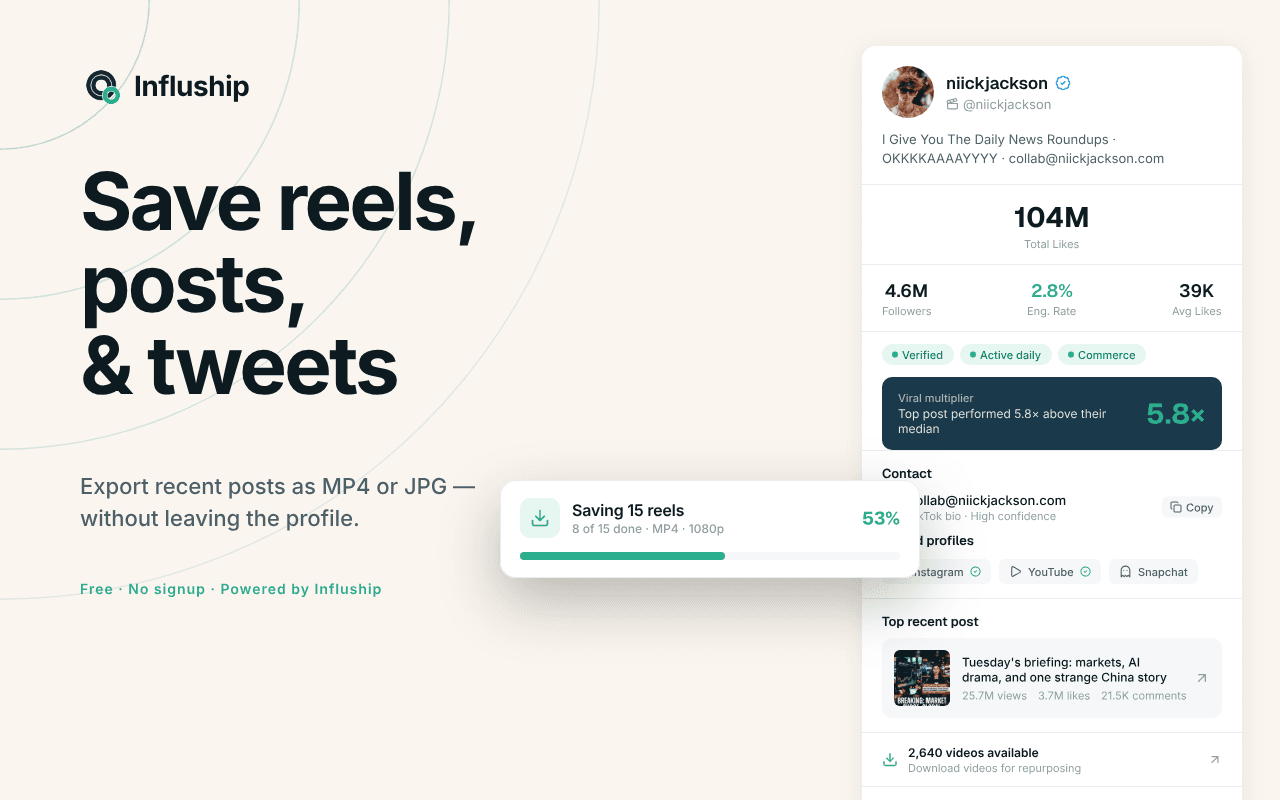
Full disclosure: we built this one. Open any creator on Instagram, TikTok, YouTube, or X, click the icon, and you get their public contact email, follower and engagement stats, and their other verified social accounts, with the verified ones surfaced first. It also flags a viral multiplier, which creators are peaking right now versus coasting, and lets you save a creator's recent reels, videos, and tweets as MP4 or JPG straight from the profile, so your campaign brief has real reference content instead of a pasted link.
Pros
- Free, no signup, no credit card
- Covers four platforms including X, which most rivals skip
- Pulls contact emails and saves post media in one click
Cons
- One profile at a time, with no bulk scoring
- We built it, so weigh our praise with the obvious grain of salt
- Heavy discovery needs the Influship platform behind it
It's free to start with no account. If you need to score 300 creators against a brief, you'll want the Influship platform behind it rather than clicking each profile. You can add it to Chrome here.
2. GRIN Creator Discovery: best free analytics for browsing
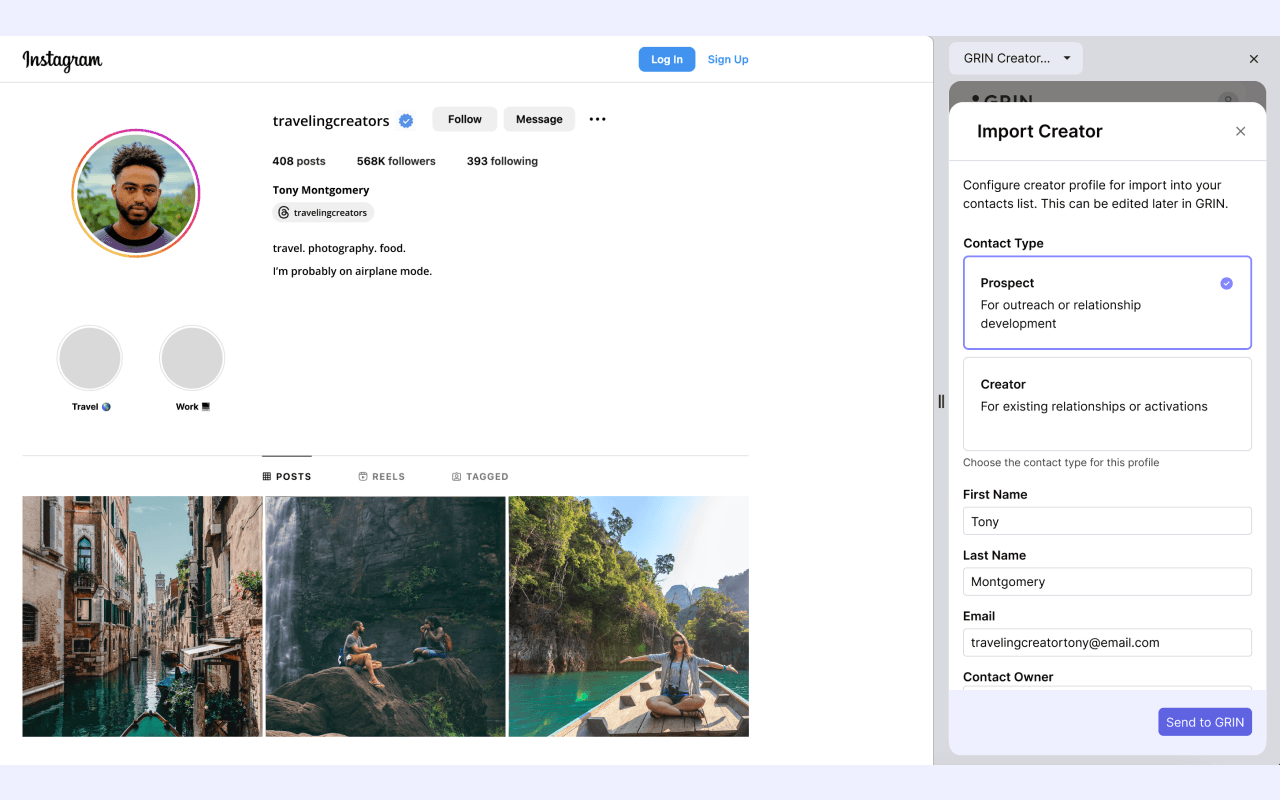
GRIN's extension works on Instagram, TikTok, and YouTube and shows engagement rate, follower trends, average likes, audience-quality signals, and a public contact email without a GRIN account. For a free tool, the audience-quality read is one of the more trustworthy ones.
Pros
- Free, with no account required to view analytics
- Surfaces a contact email plus audience-quality signals
- One-click import to GRIN's CRM for existing customers
Cons
- Built to funnel you into GRIN's paid platform
- One profile at a time, with no bulk scoring
- Modest store reputation (4.0 stars from around 25 ratings)
3. Influencer Analytics by Wednesday (Upfluence): best for deep single-profile audits
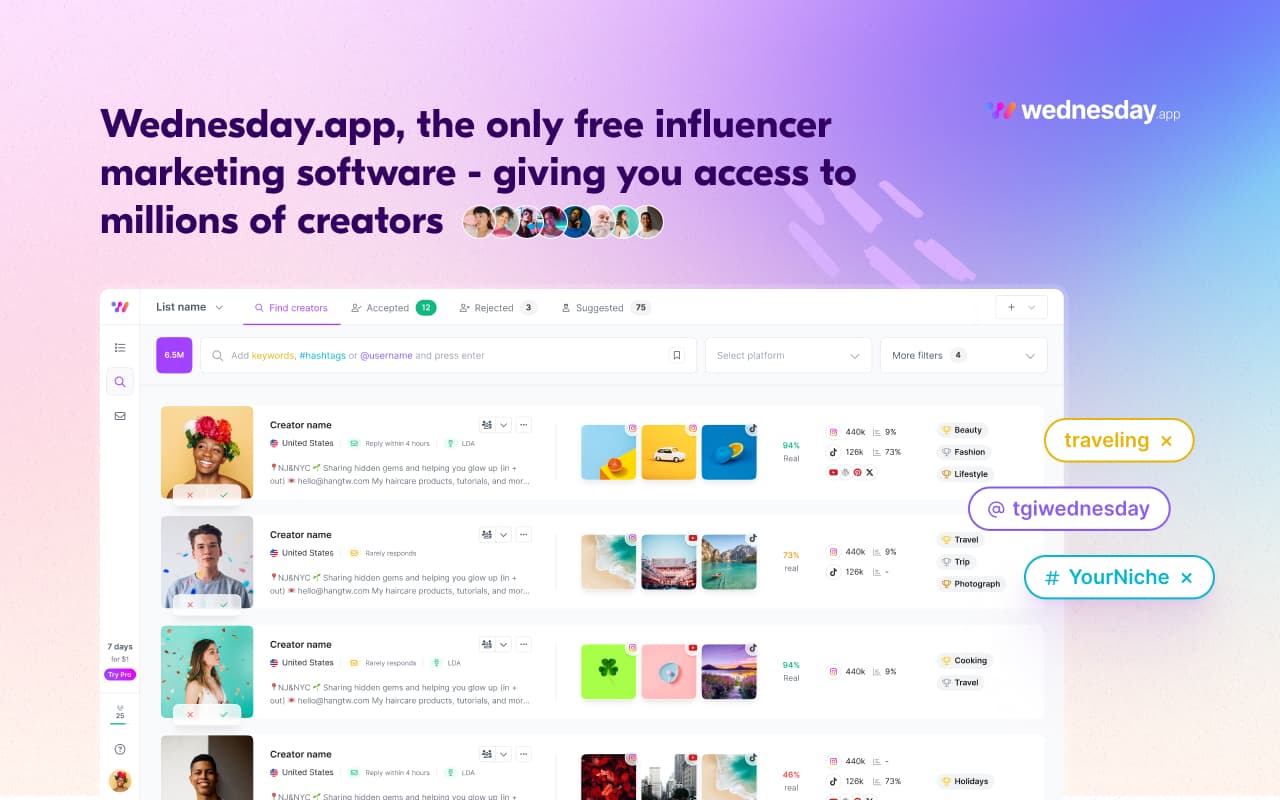
Upfluence's extension now lists on the store as "Influencer Analytics by Wednesday," built by the same team. On an Instagram or TikTok profile it shows engagement rate, estimated reach, audience demographics, real-versus-fake follower analysis, cost-per-engagement, and an auto-generated suggested collaboration price.
Pros
- Auto-suggested price and cost-per-engagement help you budget a deal fast
- Real-versus-fake follower analysis plus audience demographics
- Free profile views before any paywall
Cons
- Limited free profiles, then a prompt to book a sales meeting
- Confusing dual branding (listed as Wednesday, built by Upfluence)
- Instagram and TikTok only
4. Kolsquare Analytics Sidebar: best free read on audience demographics
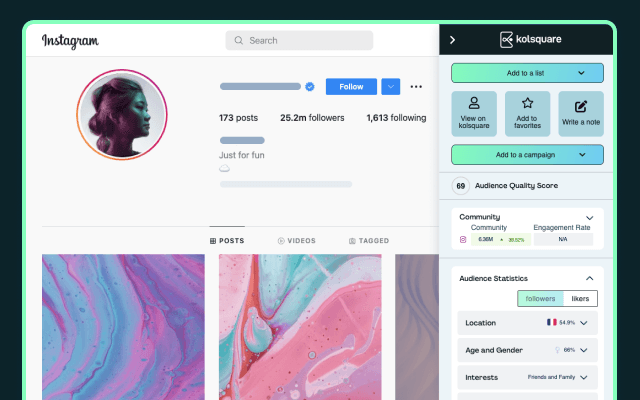
Kolsquare's sidebar surfaces engagement rate and trend, audience demographics across age, gender, location, and language, estimated reach, and a 0-100 Credibility Score that flags fake or inactive followers. The demographic breakdown is the standout, which matters when your brief specifies an audience country or age band and you need to confirm the creator reaches it.
Pros
- Strong 0-100 credibility score for fraud screening
- Detailed audience demographics and estimated reach
- Clean, fast sidebar UI
Cons
- Requires a free account, and signup may reject personal Gmail addresses
- Instagram and TikTok only
- A lead-in to Kolsquare's paid platform
5. Infloq: best free fake-follower verification
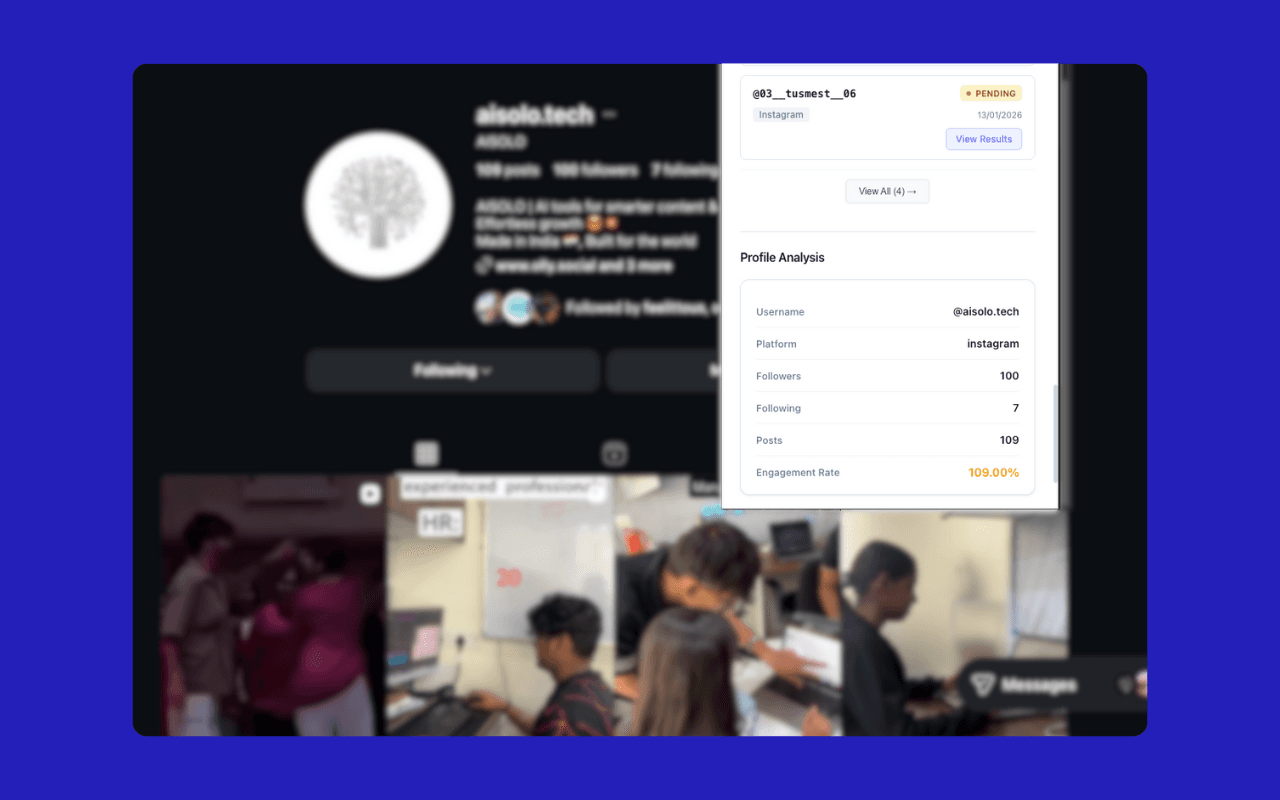
Infloq combines analytics with verification across Instagram, TikTok, YouTube, and LinkedIn: engagement and reach, authenticity scores, AI fake-follower detection, and cross-platform checks that confirm a creator is real and consistent. If your main worry is paying for inflated reach, run a creator through Infloq before you send the contract. Spotting bought followers is a skill worth building, and we wrote a full method for it in our guide to detecting fake followers.
Pros
- Free, with no registration and no usage limits
- Pairs analytics with fraud and cross-platform verification
- Broadest platform coverage here, including YouTube and LinkedIn
Cons
- Newer, smaller vendor with a shorter track record
- Authenticity scores are estimates, not guarantees
- Data depth can trail paid enterprise tools
6. Influencer Hero: best for AI-assisted first lines
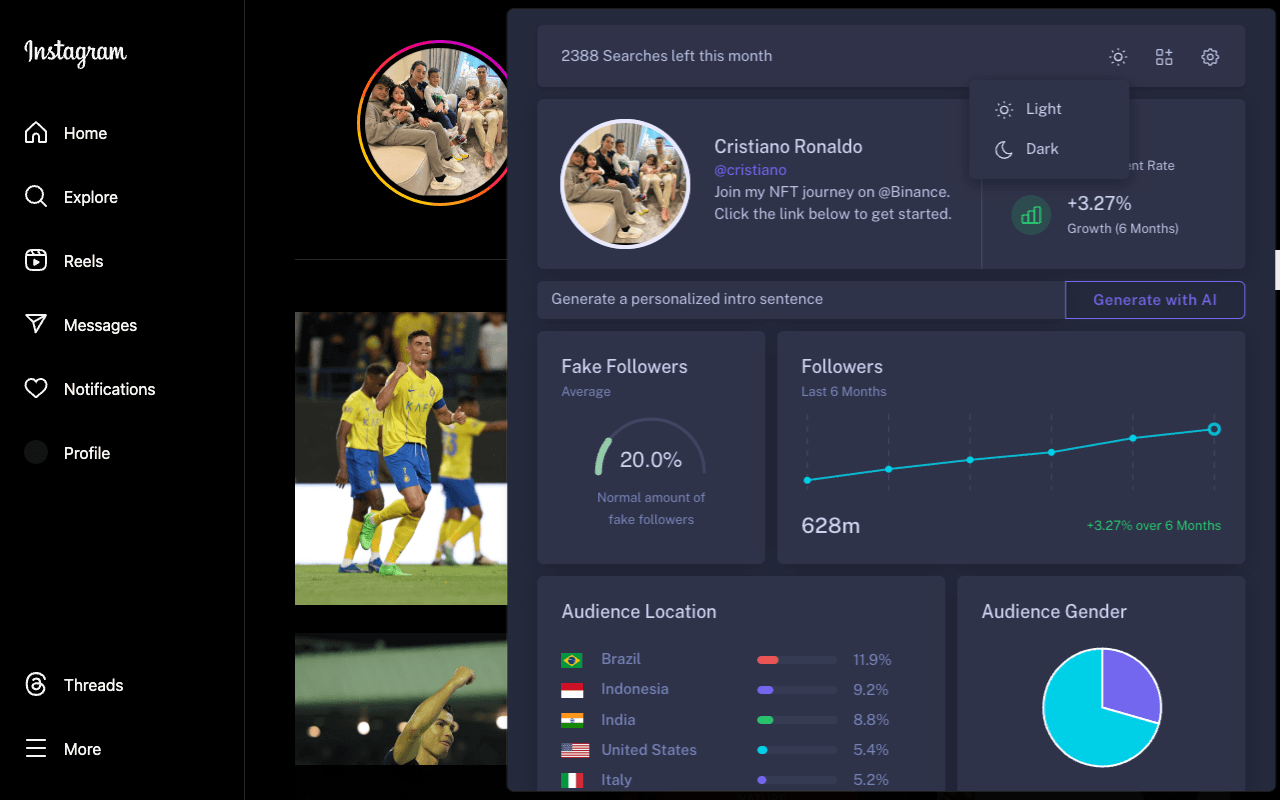
Influencer Hero overlays free analytics on Instagram, TikTok, and YouTube profiles: engagement rate, estimated fake-follower percentage, six-month follower growth, audience demographics, and an Earned Media Value estimate. It also generates a personalized opening sentence by reading a creator's recent posts. For teams sending high volumes of cold outreach, that first line saves real time.
Pros
- Broad free data panel most rivals gate behind paid plans
- Covers Instagram, TikTok, and YouTube
- AI-written first line speeds up outreach
Cons
- Deeper features push you to the paid Influencer Hero platform
- Audience-quality depth trails dedicated audit tools
- Small install base, so less battle-tested
7. HypeAuditor: best for audience-quality scoring
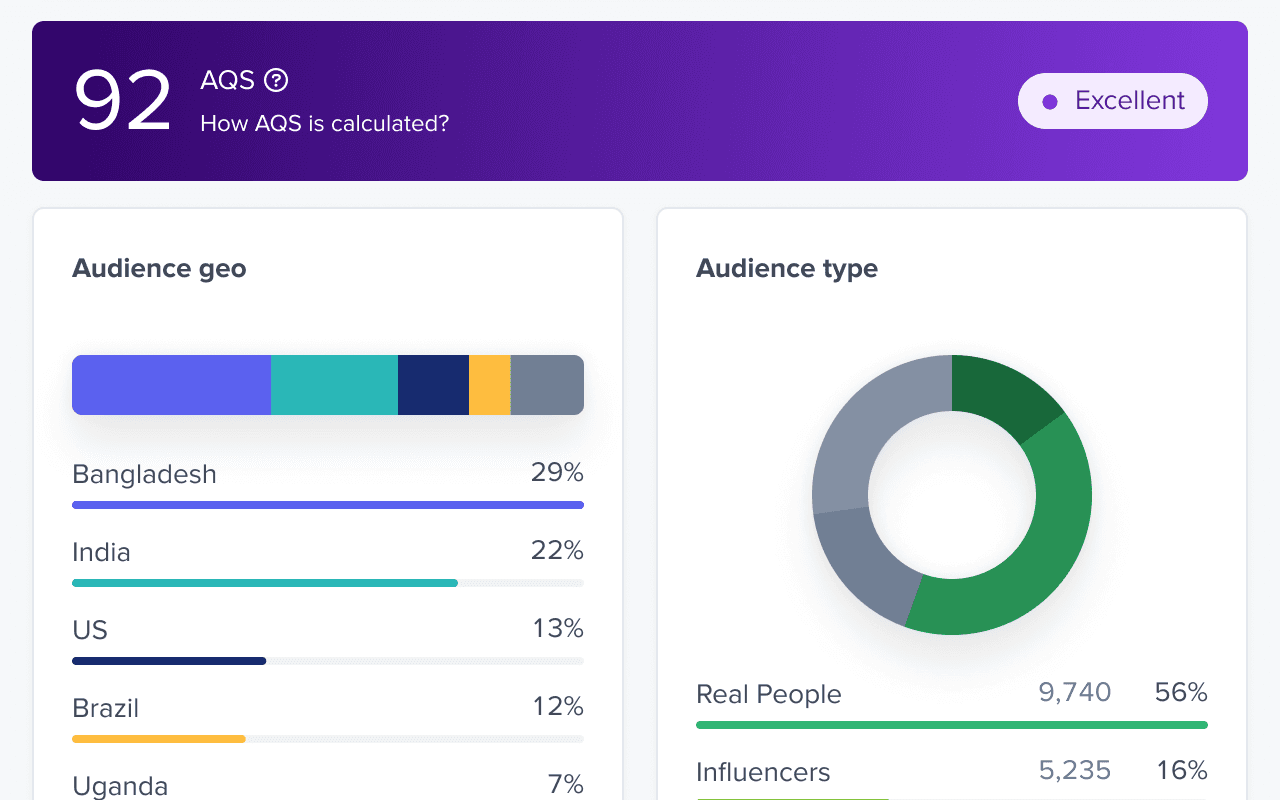
HypeAuditor shows its metrics on Instagram, YouTube, and TikTok profiles: monthly growth, engagement, audience demographics, an estimated post price, and its signature Audience Quality Score for fraud detection. The scoring model is mature, and brands that have been burned by fake engagement trust it.
Pros
- Best-in-class fraud detection via the Audience Quality Score
- Demographics plus an estimated post-cost benchmark
- Backed by HypeAuditor's established data
Cons
- Requires an account, with full reports gated behind credits
- Free usage is credit-limited
- Lowest rating of the analytics extensions here (4.4 stars)
8. Influencer Engage by influence.co: best lightweight free lookup
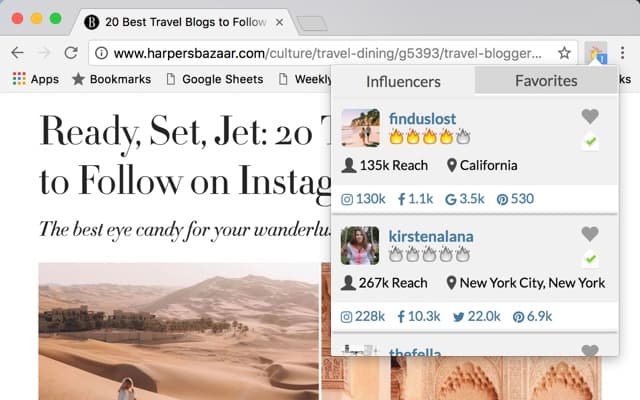
Influencer Engage turns any webpage into a lookup. It detects when an Instagram or X handle appears on the page and flags whether that creator is in influence.co's database. One click surfaces their stats, contact info, past brand collaborations, and a favorites list you can save creators to as you browse.
Pros
- Passive detection flags known creators on any page you browse
- Surfaces contact info and past brand deals
- Free, with a built-in favorites list
Cons
- Instagram and X only, with no TikTok or YouTube
- Only works for creators already in influence.co's database
- Tiny, dated user base
9. Social Blade: best free historical growth data
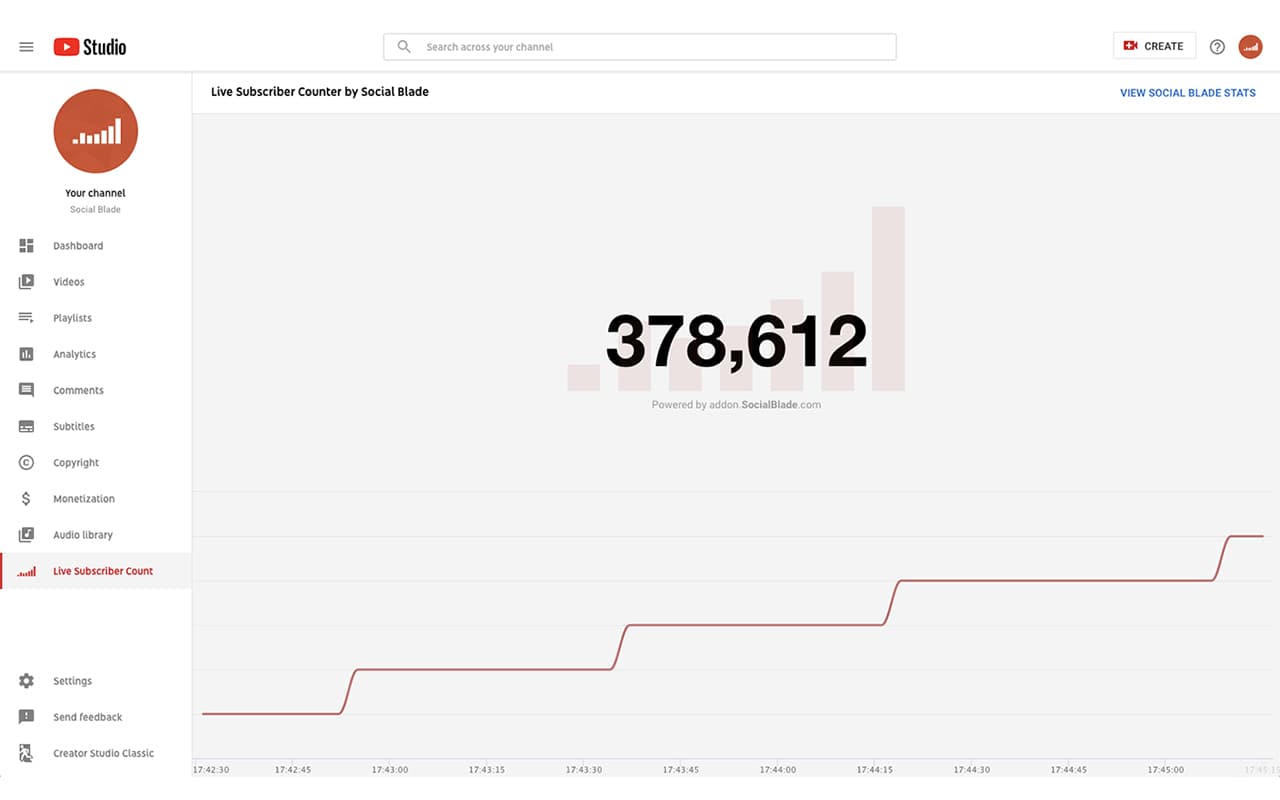
Social Blade isn't an influencer-marketing tool, but marketers have used its extension for years to read follower and subscriber history on YouTube and Twitch: channel grade, subscriber and view rank, estimated earnings, and 30-day growth. When you want to see whether a creator's growth is steady or whether they bought a spike, the historical chart tells the story.
Pros
- Huge, established install base and a trusted growth-data source
- Strong subscriber and view trends plus earnings estimates
- Free with a Social Blade account
Cons
- The YouTube overlay has been broken since Chrome 127, with a rebuild in progress
- Built for YouTube and Twitch, so weak for Instagram and TikTok
- No fake-follower, demographic, or brand-fit data
Side-by-side comparison
| Extension | Free | No signup | Platforms | Emails | Audience audit |
|---|---|---|---|---|---|
| Influship Creator Emails | Yes | Yes | IG, TikTok, YouTube, X | Yes | Stats + viral signal |
| GRIN | Yes | Yes | IG, TikTok, YouTube | Yes | Yes |
| Wednesday (Upfluence) | Freemium | Free views, then account | IG, TikTok | No | Fake-follower + price |
| Kolsquare | Free | Account | IG, TikTok | No | Credibility score |
| Infloq | Yes | Yes | IG, TikTok, YouTube, LinkedIn | No | Verification |
| Influencer Hero | Free | Account | IG, TikTok, YouTube | No | Fake followers + EMV |
| HypeAuditor | Freemium | Account | IG, YouTube, TikTok | No | Audience Quality Score |
| influence.co Engage | Free | Account | IG, X | Yes | Limited |
| Social Blade | Free | Account | YouTube, Twitch | No | Growth + earnings |
The pattern worth noting: most of these make you create an account before you see a single number. The ones you can install and use cold, with no email gate, are the ones you'll keep.
Best browser extensions for influencer marketing if you're not on Chrome
Most of these are Chromium extensions, which means they install on Microsoft Edge, Brave, Arc, and Opera from the Chrome Web Store with no change. If your team runs Edge or Brave, you're not locked out of any tool on this list except where a vendor publishes Chrome-only.
Firefox is the gap. Most influencer-marketing extensions don't ship a Firefox build, so a Firefox-first team either keeps a Chromium browser open for vetting or works from a web platform instead. That's worth knowing before you standardize a workflow around an extension your browser can't run.
What a browser extension can't do (and when you've outgrown one)
Extensions are built for evaluating creators one at a time. The moment your job becomes finding and filtering creators at volume, the extension model works against you.
Picture a real campaign. Drift, a magnesium sleep gummy brand, is launching for sleep-anxious adults and needs 50 nano and micro creators on TikTok and Instagram, US audience, 3%-plus engagement. With an extension you start strong. You browse the sleep and wellness side of TikTok, click the icon on each promising creator, capture the email and stats, and drop them in a sheet. By creator 12 it's working. By creator 30 you've spent two afternoons clicking, you keep finding the same accounts, and you have no way to filter by audience country without opening each profile by hand. The extension found you 30 names; it can't find you the next 1,000 to choose 50 from.
That's the ceiling. An extension reads the profile in front of you. It can't search the ones you haven't found yet, can't filter a database by niche and audience, and can't push clean data into your CRM.
That's where you move from an extension to a discovery platform that searches by audience and niche, or wire creator data into your own stack with an influencer search API. The extension stays useful for the quick vet while you browse. The platform does the bulk discovery and filtering the extension never could. For the wider category of tools beyond browser extensions, we keep a running list of the best influencer marketing tools.
How to choose the right one
Pick by the job you're doing this week, not by the feature list.
If you're doing cold outreach, you want emails and you want them without an account gate. Influship Creator Emails and influence.co Engage get you there fastest, with Influship covering X and post-saving on top.
If you're vetting one creator before a big deal, depth beats speed. Wednesday and HypeAuditor give you the thorough audience-quality read worth the extra clicks.
If your fear is fake followers, start with verification. Infloq and HypeAuditor are built for it, and the manual checks in our fake-follower guide catch what the tools miss.
If you're screening creators at volume, stop reaching for an extension. You've outgrown the one-profile model and you need a platform.
Most teams end up running two: a free, no-signup extension for the daily browse-and-vet, and a platform underneath it for discovery and reporting. There's no rule against installing three and keeping the two you open.
Where to go next
Start with a free extension you can install cold and judge on a real creator today. If you spend your week on outreach, Influship's Chrome extension pulls emails, stats, and linked accounts from Instagram, TikTok, YouTube, and X with no signup, and our engagement rate calculator covers the same engagement check from the browser.
When the job shifts from vetting creators to finding them in volume, that's the handoff from extension to platform. Our guides on how to find influencers on Instagram and AI influencer discovery cover what that next step looks like, and the influencer search API is there when you want the data in your own product.